
At a glance
Start with the summary and next action. Open the detail to see which evidence supports the picture.
Find it in VOXXInsights → What your coach knows; Plan → Progress & next steps
A useful training picture should explain itself. Insights brings together recorded running, your feedback and available wearable context. It also shows the gaps. You do not need to decode a single colour or score and guess whether that means you should push harder.
Step by step
Look at the recorded work
Review the selected period and the running that is actually present. Known duplicates and excluded records do not count as extra training. Strength has its own summary, so its minutes do not inflate your running total.
Open the coaching picture
What your coach knows describes recent running, whether your current check-in is complete and whether wearable comparisons are available. Use the next action to fill a meaningful gap, such as reviewing an existing run rather than logging it twice.
Explore a comparison when useful
Expand a wearable source to see usual and recent values when enough comparable history exists. Measured days and the latest reading explain coverage. Old history imported today does not become a fresh measurement.
Connect the evidence to a decision
Return to the recommendation or plan review. Insights helps explain the context; viewing a chart alone does not change your accepted sessions.
Your recorded training
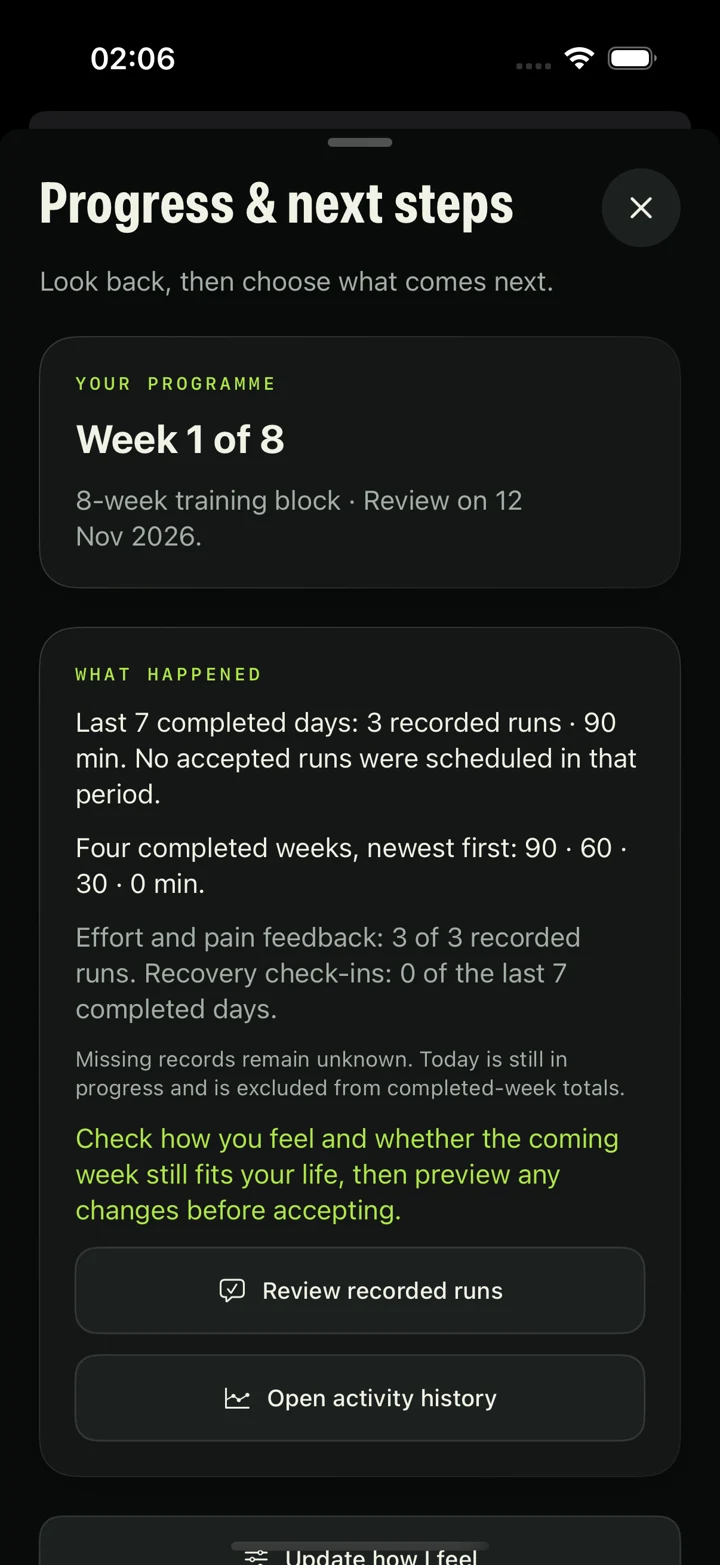
In Plan → Progress & next steps, VOXX shows one observation supported by your recent runs, such as repeated recorded activity or reported easy effort. Open Evidence & context to see the supporting runs and correct a record. Phone recordings and manually logged runs can contribute; a wearable is not required. Corrections update the observation. Too little evidence stays unknown, rather than becoming a failure or a fitness score. It does not predict race times or automatically increase training.
Your feedback
Effort and pain feedback describes how recorded runs felt. Recovery check-ins are tracked separately from the running total. The progress view shows whether recent feedback and check-ins are present; any counts visible in a sample screen are examples, not another runner’s results.
Useful comparisons
A comparison needs enough suitable readings from the same source and summary type. Your earlier imports may provide that immediately, or some measurements may remain unavailable. It is not a countdown that everyone completes after the same number of days.
Missing or uncertain evidence
Sleep and heart-rate changes can support caution when several signals change together. A stable pattern is not permission to ignore pain or increase training. Different heart-rate variability measurements stay separate, and VOXX does not turn coverage into a diagnosis, an injury-risk score or proof that you are race-ready. Your check-in still matters.
Read the progress screen
Source
Check where a run came from and review its record before using it to understand a total. Review a recorded run when a match or source needs attention.
Time period
The screen separates the last seven completed days from four completed weeks. Today remains in progress and is excluded from completed-period totals. A displayed sample value does not establish your own training history.
Limitations
Wearable comparisons depend on enough suitable history from the same source and summary type. Missing information stays unknown; these summaries are not a readiness score or a prediction. See how wearable imports and live readings differ, or review how proposed plan changes work.
VOXX is in private iPhone beta. Features and screen labels may differ between testers.
Something unclear? Tell the VOXX team.