VOXX · YOUR RUNNING WEEK
A running plan that fits your week
Start with your goal and the time you actually have. See the week, record how running feels and review suggested changes before accepting them.
Private iPhone beta · Invitation through Apple TestFlight
Explore iPhone beta access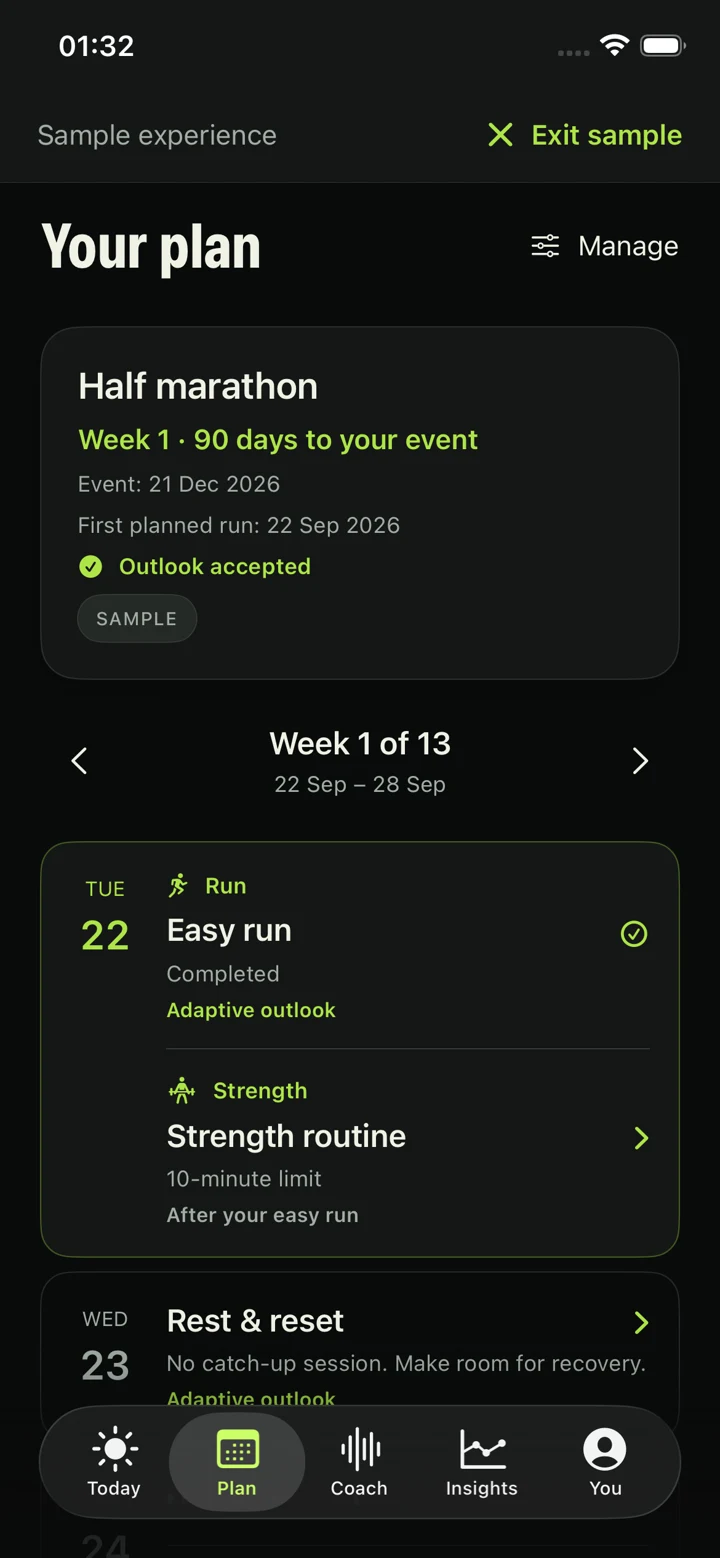
01 · PERSONALIZED RUNNING TRAINING
Start with your goal and available time
A useful plan starts with your recent running, your goal and the space in your calendar. Choose consistency or a distance goal, possible running days and session time limits. You can review imported history, use your own estimate or keep missing history unknown.
Your starting point
Review recent running and health questions. Missing records do not mean you have done no running.
Your available time
Choose days and session limits. Available minutes are a limit, not a target every session must fill.
Your plan review
Check the setup summary and preview. Saving setup and accepting the plan are separate steps.
02 · A SHARED CALENDAR
See the whole week
Accepting the preview puts sessions into Plan. Open a day to see its purpose and the warm-up, main session and cool-down. Optional strength sits alongside running, with its own instructions and completion record.
Rest has a place in the calendar. Missed sessions do not become a pile of catch-up work. Later weeks show a direction that still needs review as circumstances change.
03 · WHEN LIFE INTERVENES
When your schedule changes
A meeting, travel or a shorter day can make the accepted week impractical. In Plan, a temporary schedule change can cover dates from tomorrow through the next fourteen days. Choose No running, Less time or Fewer running days.
WORKFLOW EXAMPLE · NOT AN INDIVIDUAL TRAINING PLAN
The original week
You have an accepted week, but a work trip leaves less time on two upcoming days.
The proposed change
Choose the dates and Less time. Read the affected running and strength sessions and the reasons in the preview. An eligible adjustment is not guaranteed for every request.
What stays the same
Your usual settings and goal stay saved. Completed or started sessions stay in history. The calendar changes only when you accept.
The sample screen shows an accepted Plan. This text example explains the review process; the available changes depend on the runner’s current plan and circumstances.
Follow the schedule-change guide for eligible moves, pauses and returning after a disruption.
04 · YOUR ACCEPTANCE MATTERS
Review before accepting
Check-ins, recorded runs and available imported summaries can inform a review. Later imports do not silently replace the accepted calendar. Review separates what was recorded, what it means and the proposed session changes.
Correct a record or check-in if something is wrong, then refresh the review. You can keep unchanged sessions or accept an updated plan. Core plan review works offline without a wearable; online Coach explanation is optional.
Recovery limits can rule out a move. VOXX does not diagnose readiness, provide medical clearance or promise injury prevention. Injury-related return uses a separate workflow based on your treating professional’s instructions.
05 · FOLLOW THE SESSION
Hear one actual session cue
The accepted session can include spoken timing and guidance. This seven-second AI voice sample is an actual session cue, read by Cedar. It does not demonstrate continuous conversation.
Transcript
Now ease into a gentle run. Keep it comfortable enough to talk in full sentences. You can walk whenever you need to.
06 · FIT BEFORE FEATURES
Who the beta is for
VOXX is for runners who want a clearer week and are willing to test a product still being refined. You need an iPhone with iOS 18 or later. A wearable is optional; supported devices and permissions add specific capabilities.
An app plan does not replace individual professional advice. Optional strength is an introductory general routine, and no fitness outcome is guaranteed.
Check wearable support and limits · Explore the VOXX running app.
PRIVATE IPHONE BETA
Make room for your running week.
Request a place in the VOXX iPhone beta. Access is by invitation through Apple TestFlight. An iPhone running iOS 18 or later is required; a wearable is optional.
Request beta access for your running weekA short form. The team will email you about availability and next steps. A request does not create an account or guarantee access.